Hyperscale4 configurationsPriced in USDIndependent marketplace
Azure
Buy Azure Account
Teams evaluating cloud infrastructure often need more than a basic virtual machine. They require access to a broad platform that supports compute, storage, networking, managed services, AI capabilities, and flexible billing. This page is written for developers, startups, agencies, SaaS teams, researchers, and IT professionals who are considering a Buy Azure Account option available through RunCloudMarket. It explains what Microsoft Azure infrastructure typically involves, how different account and credit configurations are commonly used, the practical factors that influence selection, realistic workloads, and the steps that support responsible evaluation and setup.
Prices are marketplace prices in USD and are independent of any
ongoing charges billed by the provider after transfer.
Teams evaluating cloud infrastructure often need more than a basic virtual machine. They require access to a broad platform that supports compute, storage, networking, managed services, AI capabilities, and flexible billing. This page is written for developers, startups, agencies, SaaS teams, researchers, and IT professionals who are considering a Buy Azure Account option available through RunCloudMarket. It explains what Microsoft Azure infrastructure typically involves, how different account and credit configurations are commonly used, the practical factors that influence selection, realistic workloads, and the steps that support responsible evaluation and setup.
RunCloudMarket operates as a marketplace for legitimate cloud-service users. The distinction between the marketplace and Microsoft Azure itself remains clear throughout. The information here focuses on helping you understand the platform, assess fit for your projects, and approach any available listing with clear expectations around access, resources, and ongoing responsibilities.
On this page
Understanding Microsoft Azure as a Cloud Platform
Microsoft Azure is a comprehensive public-cloud platform that provides on-demand compute, storage, networking, databases, analytics, AI services, and hybrid connectivity options. An Azure subscription (commonly referred to as an Azure account in marketplace contexts) serves as the billing and access boundary. Within that subscription, users can create resource groups, deploy virtual machines, configure virtual networks, provision storage accounts, and consume a wide catalog of managed services.
Core compute offerings include virtual machines of many sizes and series, ranging from economical burstable instances suitable for development and light workloads to memory-optimized, compute-optimized, and GPU-accelerated options. Storage spans blob, file, disk, and specialized data-lake capabilities. Networking foundations include virtual networks, load balancers, application gateways, private endpoints, and hybrid connectivity tools. Higher-level services cover containers, serverless functions, managed databases, AI model hosting, and developer tooling integrations.
New customers frequently encounter free-tier amounts for selected services and a limited-time credit that can be applied to eligible usage. After the initial period, most production use moves to pay-as-you-go or commitment-based pricing models such as reservations or savings plans. Regional presence spans dozens of geographic locations, allowing resource placement closer to users or in line with data-residency requirements.
When reviewing a Buy Microsoft Azure Account or related listing, the practical value lies in the combination of subscription access, any associated credits or free amounts, the ability to deploy the required resource types, and clear understanding of billing and policy boundaries. Azure is not a single product; it is a platform whose usefulness depends on matching specific services and resource configurations to the workload.
Why Organizations and Individuals Look at Azure
Several characteristics draw technical teams to Azure. Integration with the broader Microsoft ecosystem—identity, developer tools, productivity services, and enterprise agreements—can simplify adoption for organizations already invested in those technologies. The breadth of the service catalog supports both lift-and-shift virtual-machine workloads and modern architectures built around containers, serverless, or managed PaaS offerings.
Global reach and compliance certifications make Azure relevant for applications that must serve users in multiple regions or meet industry and regulatory requirements. Hybrid and multi-cloud capabilities, including tools for extending management and identity across on-premises and other clouds, address environments that are not purely public-cloud. AI and machine-learning services, including access to large language models and specialized compute, attract teams building intelligent applications.
For many developers and smaller teams the combination of free service amounts, trial credits, and pay-as-you-go flexibility lowers the barrier to experimentation. Larger organizations often value the ability to apply enterprise agreements, reserved capacity, or savings plans once usage patterns stabilize. An Azure Cloud Account can therefore serve proof-of-concept work, development pipelines, and production systems when the resource and governance model matches the team’s maturity and requirements.
Evaluating Account Types and Credit Configurations
Marketplace listings related to Azure commonly reference different practical configurations. Understanding the distinctions helps avoid mismatched expectations.
An Azure Credit Account typically emphasizes the presence of remaining promotional or prepaid balance that can offset eligible usage. A listing that highlights Buy Azure Credits focuses on the credit balance itself and the period during which it can be applied. An Azure Account with Credits combines subscription access with a usable balance. An Azure Free Trial Account generally points to the standard new-customer trial experience that includes limited-time credit and free service amounts, subject to Microsoft’s current eligibility rules.
Specialized listings may reference an Azure VPS Account or Azure VM Account when the primary use is virtual-machine hosting. An Azure Hosting Account often signals a focus on web or application hosting workloads. An Azure AI Account or Azure GPU Account indicates interest in machine-learning services or GPU-accelerated virtual machines. These labels are descriptive rather than official Microsoft product names; the underlying subscription and resource limits determine actual capability.
When assessing any Azure Account for Sale, examine the concrete details: remaining credit (if any), eligibility for free service tiers, regional access, ability to create the needed resource types, and clarity around billing ownership after any credit is exhausted. Credits are finite and subject to the provider’s terms; they do not remove the need for ongoing cost monitoring once the balance is used.
Resource Considerations That Influence Fit
Selecting an appropriate configuration requires mapping workload needs to Azure resource categories.
Compute Virtual-machine series differ in CPU architecture, memory-to-core ratio, temporary storage, and specialized hardware (GPU, high-performance storage, etc.). Burstable series suit variable low-to-moderate utilization; general-purpose and compute-optimized series serve steady production loads. GPU series support AI training, inference, rendering, or other accelerated workloads. Container and serverless options provide alternatives when full VM control is unnecessary.
Storage Disk storage attaches to virtual machines. Blob storage handles unstructured objects. File shares support lift-and-shift scenarios. Performance tiers (standard, premium, ultra) and redundancy options affect both cost and durability. Data-transfer and operation charges should be estimated for data-intensive applications.
Networking Virtual networks form the private connectivity fabric. Load balancers, application gateways, and front-door services distribute traffic. Private endpoints and service endpoints reduce public exposure. Hybrid connectivity (VPN, ExpressRoute) links Azure to on-premises or other environments. Bandwidth and data-egress pricing influence architecture decisions for multi-region or hybrid designs.
Identity, security, and governance Microsoft Entra ID (formerly Azure AD) underpins authentication and authorization. Role-based access control, resource locks, policies, and monitoring tools support secure multi-user environments. Understanding who holds the subscription owner role and how additional users or service principals will be granted access is essential.
Region and availability Resource availability, latency, and data-residency rules vary by region. Some services or SKUs are not present in every location. Multi-region designs improve resilience but introduce complexity and cost.
Billing and cost management Pay-as-you-go, reserved instances, savings plans, and spot pricing each suit different risk and utilization profiles. Cost-management tools, budgets, and alerts help prevent unexpected charges. Any marketplace listing that includes credits should be evaluated for remaining balance, expiration, and eligible services.
These factors apply whether the listing is described as an Azure Cloud Account Online or a more specialized configuration. Accurate mapping of needs to resources reduces the chance of selecting an account that cannot support the intended work or that generates unforeseen costs.
Practical Workloads That Align with Azure Capabilities
Azure infrastructure supports a wide range of legitimate use cases when resources and architecture are chosen appropriately.
Application and web hosting Virtual machines, App Service, or container platforms can host websites, APIs, and multi-tier applications. Load balancing, autoscaling, and managed databases complement the compute layer. Teams that need full OS control often prefer VMs; those seeking managed platforms lean toward PaaS offerings.
Development, testing, and staging environments Developers frequently provision short-lived or longer-running environments that mirror production configurations. Free service amounts and trial credits make experimentation more accessible. An Azure Account for Developers often centers on this ability to iterate without immediate large financial commitment.
SaaS and multi-tenant platforms SaaS teams deploy application tiers, shared or isolated databases, background processing, and monitoring. Identity integration, regional placement, and scaling mechanisms support growth. Cost-management practices become critical as usage expands.
Data and analytics workloads Managed databases, data lakes, analytics services, and ETL pipelines can be combined with compute resources. Storage performance and data-movement costs require careful planning.
AI and machine-learning projects Model training, fine-tuning, and inference benefit from GPU-accelerated virtual machines or specialized AI services. An Azure AI Account or Azure GPU Account listing is relevant when the primary need is access to those capabilities. Credit balances can offset initial experimentation costs, subject to eligibility and remaining balance.
DevOps and automation CI/CD agents, artifact storage, infrastructure-as-code tooling, and monitoring stacks run effectively on Azure resources. Integration with Microsoft developer tools and GitHub further streamlines workflows for many teams.
Hybrid and enterprise scenarios Organizations with existing on-premises infrastructure use Azure for burst capacity, disaster recovery, or gradual migration. Identity and networking features support consistent management across environments.
In each case the platform is useful because of the combination of service breadth, regional options, and flexible consumption models rather than any single feature. Success depends on matching the account’s practical limits and the team’s operational practices to the workload’s requirements.
Who Typically Benefits from Azure Infrastructure
Developers and technical founders gain from rapid provisioning, a rich service catalog, and the ability to start with modest free or credit-based usage. Startups can validate ideas and scale selected components as product-market fit improves. Agencies managing client projects value isolated environments and clear cost attribution.
SaaS product teams and DevOps practitioners benefit from automation capabilities, managed services, and integration with existing Microsoft or open-source tooling. IT professionals supporting business applications appreciate identity integration, compliance options, and hybrid connectivity. Researchers and AI practitioners use GPU and specialized services for experimentation and model work.
Organizations with multi-region user bases or regulatory constraints find value in the global footprint and compliance portfolio. Teams already using Microsoft identity or productivity services often experience smoother operational integration. An Azure Hosting Account or broader subscription is most effective when the buyer has defined approximate resource needs and accepts responsibility for configuration, security, and cost oversight.
Selecting the Right Configuration for Your Needs
Begin by documenting the primary workload characteristics: expected concurrent users or transactions, data volume, latency targets, availability requirements, and any specialized needs such as GPU acceleration or hybrid connectivity. Translate those into rough resource estimates for compute, storage, and networking.
Decide whether virtual machines, containers, serverless, or managed PaaS services best match the operational model. Confirm that the required regions and service SKUs are available. Estimate monthly cost under pay-as-you-go assumptions and compare against any available credits or free amounts.
Review identity and access requirements. Determine how many users or service principals need access and what roles they will hold. Plan monitoring, backup, and cost-alert strategies from the start.
When comparing marketplace options, prioritize clear descriptions of remaining credit (if any), access method, regional capabilities, and post-credit billing responsibility. Avoid assuming that every listing supports every service or region. An Azure VPS Account or Azure VM Account focused on compute may not automatically include specialized AI or GPU capacity; verify the details.
Finally, align the choice with internal expertise. Fully self-managed environments require ongoing patching, security hardening, and cost vigilance. Managed services reduce some operational load but introduce different cost and configuration considerations.
Critical Checks Before Completing a Purchase
A structured review reduces risk:
Confirm the exact nature of the offering: subscription type, remaining credit balance and validity period, free-tier eligibility, and any usage restrictions.
Verify delivery of credentials or access method and the expected timeline.
Clarify ongoing billing ownership once any credit is exhausted.
Review Microsoft’s current terms of service, acceptable-use policy, and any marketplace-specific conditions.
Assess security posture after access is granted: strong authentication, role assignments, network controls, and logging.
Understand support boundaries—what the marketplace provides versus Microsoft’s support channels.
Evaluate data-export and exit options so workloads can be migrated if needed.
For AI or GPU-focused listings, confirm availability of the required SKUs and any quota considerations.
These checks apply equally to a Buy Azure Account, an Azure Account for Sale, or any specialized configuration. Credits and free amounts are subject to Microsoft’s rules; marketplace transactions do not alter those underlying policies.
Access, Security, and Responsible Operation
After receiving access, prioritize secure configuration. Enable multi-factor authentication, review and minimize privileged role assignments, and apply network security groups or Azure Firewall rules to limit exposure. Keep virtual machines and container images updated. Use managed identities where possible instead of long-lived secrets.
Implement cost controls: budgets, alerts, and regular reviews of resource utilization. Untagged or idle resources can accumulate charges quickly once credits are consumed. Establish backup and recovery procedures appropriate to the data criticality.
Responsible use requires adherence to Microsoft’s terms. Activities that violate acceptable-use policies can result in suspension regardless of how the subscription was obtained. Treat the environment with the same operational discipline applied to any production or development system.
Document credentials, resource inventory, and configuration decisions. Clear internal records support continuity and security reviews. When working with an Azure Cloud Account Online, maintain awareness of both the marketplace relationship and the direct relationship with Microsoft Azure.
Getting Started After Access Is Obtained
A practical sequence after receiving credentials typically includes:
Sign in to the Azure portal and verify subscription status, remaining credit (if any), and free-service eligibility.
Configure cost alerts and budgets.
Create a resource group structure that reflects logical application boundaries.
Provision the first compute resources—virtual machines, App Service plans, or container environments—according to the planned architecture.
Apply security baselines: update systems, configure authentication, restrict public access, and enable monitoring.
Deploy application components or development tooling.
Establish backup, monitoring, and cost-review routines.
Document the environment for team hand-off or future reference.
Test scaling and recovery procedures before placing production traffic on the resources.
For AI or GPU workloads, confirm quota and SKU availability early and monitor utilization closely because accelerated compute can consume credits rapidly. For multi-region or hybrid designs, validate connectivity and identity consistency before expanding the footprint.
An Azure Free Trial Account or credit-bearing subscription becomes productive once this foundational work is complete. The same disciplined approach applies whether the goal is a simple development environment or a multi-service production system.
Closing Perspective and Next Steps
Choosing cloud infrastructure requires aligning technical requirements, operational capacity, and cost expectations. Microsoft Azure’s combination of service breadth, regional coverage, identity integration, and flexible consumption models makes it a strong candidate for many development, testing, AI, and production scenarios. A carefully selected Buy Microsoft Azure Account can provide a practical starting point when the resource profile, credit details (if any), and usage plans are clearly understood.
RunCloudMarket presents marketplace options for users who have already identified Azure as a suitable platform and are reviewing available account or credit configurations. Explore the listings that match your resource and access needs, compare the concrete details, and contact the marketplace team if clarification on any specific option would help. Informed selection and disciplined operation remain the most reliable foundation for productive use of the platform.
Buy Azure Account configurations and what each one covers
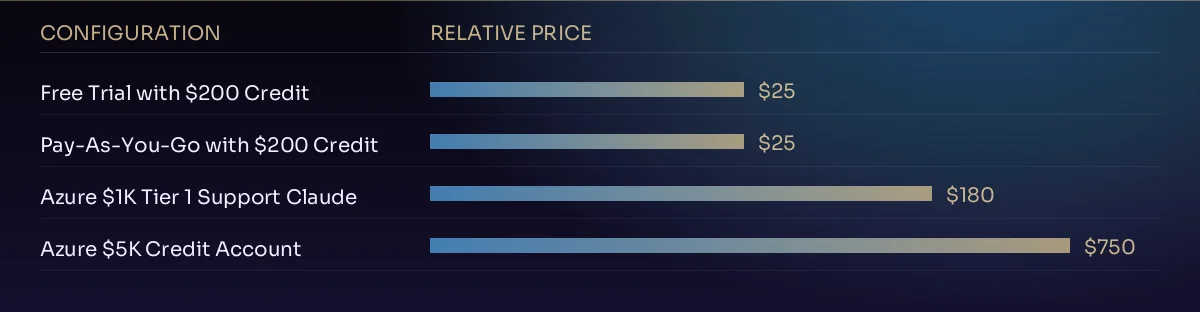
The buy azure account listings on this page cover 4 configurations, priced from $25 to $750. The chart below plots them on a logarithmic scale so the entry-level and largest options stay readable side by side; the table underneath the purchase panel lists the exact figure for each.
Relative pricing of every Azure configuration currently listed. Prices are marketplace prices in USD.
Azure at a glance
Platform characteristics relevant to a buy azure account decision
Platform model
Entra ID tenant for identity, subscription for billing and quota, resource groups for resources
Compute service
Azure Virtual Machines, with AKS for containers and Functions for serverless
Permission model
Two parallel systems — Azure RBAC on resources, Entra ID roles on the directory
Account states listed
Free trial with credit, pay-as-you-go with credit, and larger credit tiers
If identity already lives in Entra ID and you hold Windows Server or SQL Server licensing, the operational path is shorter here than anywhere else. A Buy Microsoft Azure Account listing on a pay-as-you-go offer is what makes Hybrid Benefit usable.
Workloads that need a specific jurisdiction
Azure has broad sovereign-region coverage, which matters when a contract names the country the data must sit in. An Azure VM Account in the right region removes a migration later.
What to verify before you buy Azure Account
Every checklist below is specific to this platform. Working through it is what separates a listing you can operate from one you merely hold.
The offer type — a free-trial subscription applies a spending cap that stops deployments, while pay-as-you-go does not.
Which Entra ID tenant the subscription trusts, and whether it should be moved to one you control.
Both permission systems: Azure RBAC assignments and Entra ID directory roles are audited separately.
Every service principal and app registration, along with its client secrets and their expiry dates.
Quota for the VM family you need, in the specific region you need it — availability is genuinely uneven.
The wider sequence — evaluating a listing, ordering, completing a genuine ownership transfer and hardening afterwards — is set out on the how it works page.
To see every listing in one place, open the full cloud accounts catalogue. If a detail is not stated on this page, ask before ordering rather than assuming — we would rather tell you a configuration is unsuitable than sell you one that is.
Questions
Buy Azure Account — FAQ
What does an Azure account provide?
An Azure subscription grants access to the Azure portal and the ability to create and manage resources within the limits of the subscription type, any remaining credits, free service amounts, and Microsoft’s current policies. Specific capabilities depend on the configuration and remaining balance.
What should I examine before selecting a configuration?
Map workload requirements to compute, storage, networking, and specialized services. Confirm regional availability, credit or free-tier details, billing responsibility after credits, and compliance with terms of service.
How do credits and free amounts typically work?
New-customer trial offers commonly include a limited-time credit usable on eligible services plus monthly free amounts of selected services for a defined period. Credits expire; free amounts are subject to quantity and eligibility rules. Always verify current Microsoft terms.
Can Azure support development and testing work?
Yes. Many teams use virtual machines, App Service, containers, and managed databases for development, staging, and continuous-integration environments. Free amounts and credits can offset initial costs when eligibility applies.
What resources matter most for typical workloads?
CPU and memory sizing for virtual machines, storage performance and capacity, network bandwidth and egress, regional placement, and any specialized hardware such as GPUs. The relative priority depends on whether the workload is compute-bound, data-intensive, latency-sensitive, or AI-focused.
How should security be handled after obtaining access?
Enable multi-factor authentication, apply least-privilege role assignments, restrict network exposure, keep systems updated, and implement monitoring and backup. Treat the subscription with production-grade discipline even for development use.
Is Azure suitable for production business applications?
It can be, when resource sizing, architecture, monitoring, backup, cost controls, and operational practices match the reliability and performance expectations of the application. Evaluate scaling paths and support options carefully for critical systems.
What should I confirm about ownership and ongoing use?
Clarify credential delivery, who controls billing after any credit is used, support channels, and exit procedures. Ensure the intended use complies with both marketplace conditions and Microsoft’s terms.
Teams that need additional Amazon Web Services capacity often look for a straightforward path to a working environment rather than repeating the full signup and verification sequence. At RunCloudMarket you can review options to Buy AWS Account setups that already include identity, billing, and project access suited to development, testing, production, or specialized workloads. This page explains how AWS accounts are structured, what different configurations typically offer, the practical factors that matter when evaluating a listing, and how to approach ownership transfer responsibly.
Looking for a practical way to access Google Cloud infrastructure without starting from a blank signup form? At RunCloudMarket you can explore options to Buy Google Cloud Account configurations suited to development, testing, production workloads, and specialized compute needs. This page walks through what a Google Cloud environment typically includes, how different account setups support common projects, and the practical points to review before you commit.
Developers and teams looking for straightforward virtual servers, predictable pricing, and a clean developer experience often evaluate DigitalOcean when they need reliable cloud infrastructure without unnecessary complexity. This page is written for anyone considering a Buy DigitalOcean Account option available through RunCloudMarket. It covers what DigitalOcean’s platform typically offers, how Droplet-based and related configurations work, the practical factors that matter when selecting an account, realistic workloads, and the steps that support careful evaluation and responsible use.
Teams that need straightforward, developer-oriented cloud infrastructure often look for a practical entry point. At RunCloudMarket, the option to Buy Linode Account provides access to virtual machines, storage, networking, and related services built around the long-established Linode platform (now part of Akamai Cloud Computing). This page explains what these accounts typically enable, the range of server and resource configurations commonly available, realistic use cases, evaluation criteria, and responsible steps for moving from selection to active use.
The tenancy model is the decision everything else inherits. Choosing it late, or by accident, is how SaaS platforms end up expensive and hard to certify.
Azure separates identity from billing more sharply than any other major platform. A subscription can be moved between tenants, which makes "who owns this" a question…
Read article
Talk to us first
Confirm the details before you order
Send the workload profile and the region you need. We will tell you which configuration of Buy Azure Account actually supports it — or say plainly if none does.